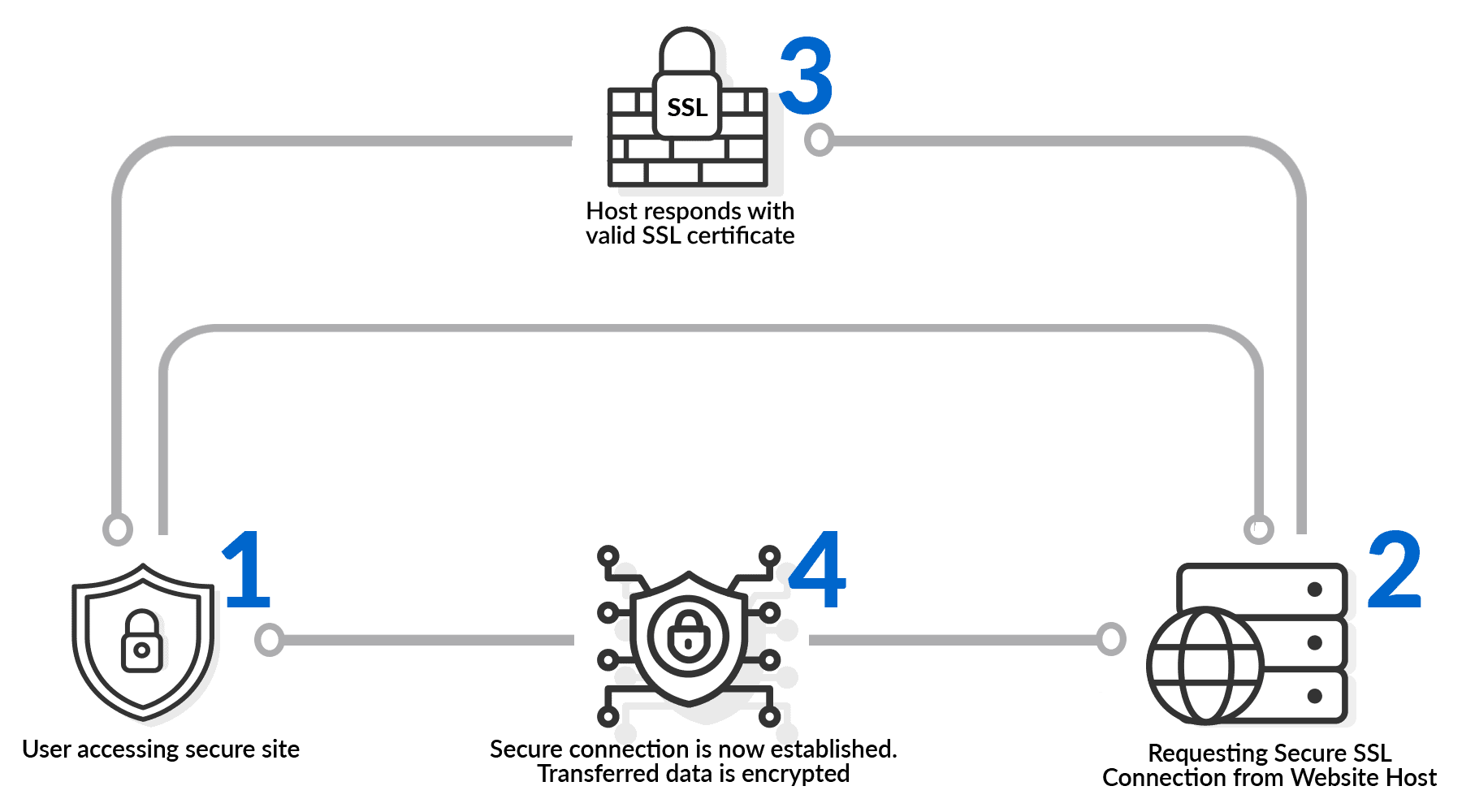
SSL or Secure Sockets Layer, is a special file on your web server that enables encrypted security for online communications. It creates an encrypted connection between your web server and your visitors’ web browser. SSL certs are usually indicated by a padlock icon on web browsers. A website that uses SSL or TLS will have "HTTPS" in its URL instead of "HTTP."
To protect you and your customers, you need an SSL certificate to be installed on your website. This is the first line of defense towards cyber-attacks that should be mandatory to all websites in the cyber world.
To prevent your customers’ sensitive data such as Credit Card Numbers and Passwords from being intercepted by a third party.

Make potential customers feel safe, trust and confident to perform online transactions or do business with you.

Search engines are trying to provide search results that are legitimate and safe to their users. Websites with SSL will get higher authority to rank better.

A safe website can increase customer confidence.
Compatibility with all major browsers and mobile devices.
Unlimited 24/7 professional customer and technical support.

Remove Not Secure warning from browsers.
Strongest encryption and trusted by all Browsers.

Secure padlock in browser.

As low as
Annually – 12 Months
As low as
Annually – 12 Months
As low as
Annually – 12 Months
As low as
Annually – 12 Months
As low as
Annually – 12 Months
As low as
Annually – 12 Months
As low as
Annually – 12 Months
As low as
Annually – 12 Months
You are protected by 100 days Risk-FREE Guarantee Program! You can cancel and get 100% refund with no reason over the next 100 days. Just let us know & we’ll send you the refund. No questions asked.
This Presumes That SSL Has Already Been Issued By SSL Issuing Authority.
To enable HTTPS on your website, you first need to obtain an SSL certificate from a certificate authority or hosting provider — many hosts, including Exabytes, offer free SSL with hosting plans. Once issued, the certificate is installed on your web server, which activates the encrypted connection. After installation, update your site settings and .htaccess file to force all traffic to redirect from HTTP to HTTPS, and update any internal links or hardcoded HTTP URLs to prevent mixed-content warnings. Most hosting control panels, such as cPanel, include a one-click SSL activation tool that handles certificate installation automatically.
The SSL (secure socket layer) protocol is the web standard for encrypting communications between users and web sites. Data sent via an SSL connection is protected by encryption, a mechanism that prevents eavesdropping and tampering with any transmitted data. SSL provides businesses and consumers with the confidence that private data sent to a website, such as credit card numbers, is kept confidential.
If you are running e-commerce transaction or you have a web site that request for customers private & confidential information, it is strongly recommended that you installed SSL to your site. In other words, to be a responsible web site owner, you shall have a SSL certificate in order to protect your customers info to be tapped or stolen via Internet.
You need to have a domain name and a dedicated IP for your website in order to setup the SSL to your website.
For QuickSSL, you may receive the SSL within 24 hours after your domain name is validated and authenticated by GeoTrust. For a fully authenticated certificate such as Power Server ID or True BusinessID certificate and it can take 3 to 5 days to be issued.
Wildcard SSL takes about 10 days to complete.
TLS (Transport Layer Security) is the modern successor to SSL (Secure Sockets Layer). While SSL was originally developed to secure online communications, it has been replaced by TLS, which offers stronger encryption and improved security. Although the terms are often used interchangeably, most “SSL certificates” today actually use TLS technology to protect data transmitted between users and websites.
Simply put, HTTPS is the same as HTTP plus SSL. It is a more secure version of HTTP.
HTTP vs. HTTPS:
HTTP has been used for a long time as a way to send information. The HTTP protocol doesn’t encrypt the data it sends. This means that users’ passwords, account information, transaction records, and other sensitive information are sent in plain text and can be stolen, changed, or used by hackers at any time. This makes the HTTP protocol a very insecure way to send private information.
HTTPS is a secure website transmission protocol that is based on SSL. After the SSL certificate is installed on a website, users who access the site using the HTTPS encrypted protocol can activate the “SSL Encrypted Channel” (SSL protocol) between the client browser and the website server. This allows encrypted transmission to keep data from being stolen or changed.
When you buy an HTTPS certificate, you add extra security to your website and your customers’ personal information.
No. There is no trial SSL certificate available.
Corporations, LLCs, sole proprietorships, partnerships, governments, and schools. Basically any entity that is legally registered with your local or state government.
No, individuals, that are not registered as a sole proprietorship, cannot apply for EV.
We are here to provide you with more information, answer any questions you may have and suggest you the best solution for your needs.
Your complete AI, Business App, Cloud, Digital and Ecommerce solutions provider
26+ years. 160,000+ businesses. Southeast Asia's most recognised name in digital infrastructure and AI solutions.
We deliver the full stack — infrastructure, apps, commerce, security, and AI — under one roof, with one support team.
We bring the latest in AI, cloud, and digital tools to you — so your business never falls behind.
We measure performance by your outcomes. That's why our clients stay, scale, and refer.
Choose Your Country
If your existing hosting with your current provider will expire in another 6-month time, we will extend your next renewal date of Exabytes hosting plan for 6 months free!
Your new hosting period with Exabytes: 12 months (new yearly hosting plan) + 6 months (free extension)
** We will extend your hosting for up to maximum of 12 months based on the balance of your remaining months with your existing provider.
If your existing hosting with other vendors will only expire in another 15 months time, we will extend your next renewal date of Exabytes hosting plan for another 12 months only as the maximum period we can extend is 12 months.
Your new hosting period with Exabytes: 12 months (new yearly hosting plan) + 12 months (free extension)
You’re all caught up! We’ll notify you when we have new announcements for you.